(This help page describes the latest version of Bingo Card Printer - 6.01)
How to Play How to play bingo:
The teacher (schools), or host (family events) will act as the caller.
The caller is responsible for preparing the bingo cards (which can be done
ahead of time), and calling the bingo items, but does not actively
play the game.
The players (students if in a classroom environment) are each given a
bingo card.
Please note: You can print up to 4 bingo cards
per page using Bingo Card Printer.
If you want, you could play a game
where multiple cards are being used per game by each player
(and the player can call Bingo if they get a winning pattern on any of their
cards). However this variation may be too complex for younger players.
Another variation is to use 1 card per game, and then work through the
cards in successive games.
Before starting to play, the caller explains what pattern the players
must mark off to win the game. For example, a single line of answers in
any direction (see Patterns section below).
The caller then begins calling items out one
at a time (using the printed call list generated by Bingo Card Printer,
or by using Bingo Card Printer's on screen call feature).
In a school environment, you can use different variations on calling,
for example:
You can print questions on the bingo cards, and call out the
answers. For example, the students could have bingo cards containing
multiplication questions, and when the teacher says
"Sixty six", the student's goal is to find a square containing a
multiplication that works out to 66.
You could provide the calls in a different form from that presented
on the card. For example, if teaching telling the time, you might say
"Twenty to three", and students need to find and
mark off the square containing 2:40 on their cards.
Rather than giving out the call directly, you could
simply provide information about it, until one of your students
tells you which item you are referring to.
For example, the teacher might say
"This is the fourth planet from the sun. It has two moons and
is known for its red color...", and eventually one of the students
should recognize that you are referring to the planet Mars.
When the caller calls out an item that is in a player's bingo card,
that play marks off the item. He should do this in such way that the
item is still readable and can be checked later (for example by writing an
X over the item).
When a player achieves one of the agreed patterns (such as a line of 5),
he shouts out "Bingo!". His card is then checked by the caller against
previous calls, and if correctly filled out, the player wins the game.
After the first player achieves a Bingo, if you want to,
you can keep playing until
a second more complete pattern is achieved by any of the players.
For example, the first bingo might require a line of 5,
but second bingo might require filling out the card completely.
Patterns
Here are some of the possible patterns that you can play for.
Please note:
If playing with a Free Space, players can mark that square off,
without it being called.
It does not matter if a player has extra squares
(in addition to those in their pattern) marked off.
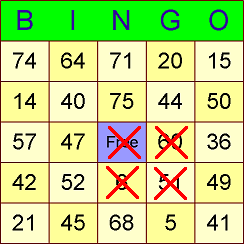
Postage Stamp:
Any 2 X 2 block of squares
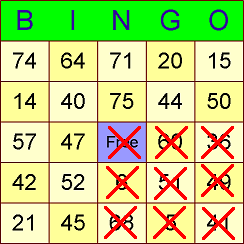
Large Postage Stamp:
Any 3 X 3 block of squares
Line:
Line of 5 in any direction (horizontal, vertical or diagonal)
Disclosure:
Our company's websites' content (including this website's content) includes advertisements for
our own company's websites, products, and services,
and for other organization's websites, products, and services.
In the case of links to other organization's websites,
our company may receive a payment, (1) if you purchase products or services,
or (2) if you sign-up for third party offers, after following links from this website.
Unless specifically otherwise stated, information about other organization's products and services,
is based on information provided by that organization,
the product/service vendor, and/or publicly available information - and should
not be taken to mean that we have used the product/service in question.
Additionally, our company's websites contain some adverts which we are paid
to display, but whose content is not selected by us, such as Google AdSense ads. For more
detailed information, please see Advertising/Endorsements Disclosures
Our sites use cookies, some of which may already be set on your computer. Use of our site
constitutes consent for this. For details, please see Privacy.
Click privacy for information about our company's privacy, data collection and data retention policies, and your rights.
"Box" and "Cover" images are shown for decorative purposes only, and do not
represent the actual products which are delivered as Internet downloads.
"Box" and "Cover" images on this site were created using
CoverFactory.
Register Now/Buy Now! buttons used on this website,
are from the CB Vendor Graphics Pack.
CERTAIN CONTENT THAT APPEARS ON THIS SITE COMES FROM AMAZON SERVICES LLC. THIS CONTENT IS PROVIDED 'AS IS' AND IS SUBJECT TO CHANGE OR REMOVAL AT ANY TIME. CERTAIN CONTENT THAT APPEARS ON THIS SITE,COMES FROM AMAZON EU S.à r.l. THIS CONTENT IS PROVIDED 'AS IS' AND IS SUBJECT TO CHANGE OR REMOVAL AT ANY TIME.
In Association With Amazon.com Answers 2000 Limited is a participant in the Amazon Services LLC Associates Program, an affiliate advertising program designed to provide a means for sites to earn advertising fees by advertising and linking to Amazon.com. In Association With Amazon.co.uk Answers 2000 Limited is a participant in the Amazon EU Associates Programme, an affiliate advertising programme designed to provide a means for sites to earn advertising fees by advertising and linking to Amazon.co.uk. As an Amazon Associate, our company earns from qualifying purchases. Amazon, the Amazon logo, Endless, and the Endless logo are trademarks of Amazon.com, Inc. or its affiliates.